The short answer.
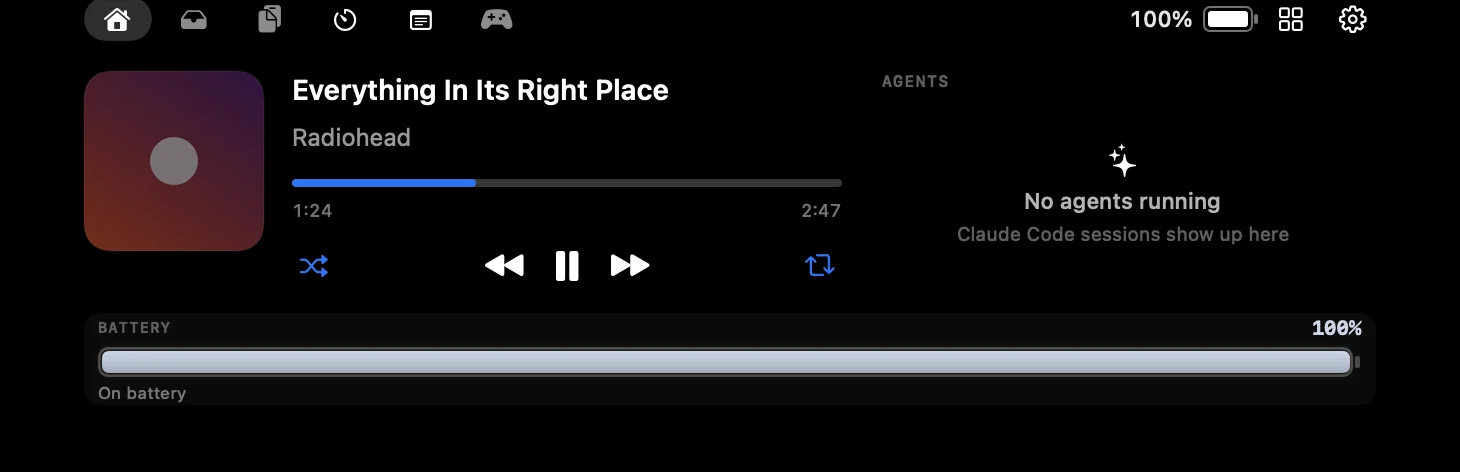
Apple does not offer a Dynamic Island on the Mac. To get one, install a notch app. FunNotch is a free, open-source one: it shows live activities for music, charging, AirPods, volume and brightness in the notch, and opens into a panel with a file shelf, clipboard history, a focus timer and notes. It needs macOS 14 Sonoma or later.

Set it up in four steps.
- Download FunNotch. Get FunNotch.dmg from the official GitHub release. It is 6.2 MB.
- Move it to Applications. Open the DMG and drag FunNotch onto the Applications shortcut.
- Allow the first launch. FunNotch is not notarized, so macOS blocks it once. Open System Settings → Privacy & Security and click Open Anyway. The install guide explains why and covers macOS 14.
- Hover the notch. The panel opens. Play some music or press a volume key to see your first live activity.
What you get.
| On the iPhone’s Dynamic Island | In FunNotch on the Mac |
|---|---|
| Now playing | Artwork and a live spectrum, a track-change peek, and a full player with a seek bar. Music controls |
| Timers | Countdowns, a stopwatch and focus sessions, with the time left beside the camera. Focus timer |
| Charging and AirPods | Live activities for charging and for Bluetooth devices connecting and disconnecting. |
| System indicators | Volume, brightness and keyboard backlight shown in the notch in place of the macOS overlay. |
| Third-party live activities | Claude Code and Codex session status, new screenshots and finished downloads. Claude Code status |
The Mac has room the iPhone does not, so FunNotch goes further: a file shelf, clipboard history, daily notes and thirteen widgets beside the camera.
What if my Mac has no notch?

FunNotch still works. On an external display, an iMac, a Mac mini or an older MacBook, it draws a rounded floating island at the top of the screen, which is closer to the iPhone’s Dynamic Island than a notch is.
Other ways to do it.
FunNotch is not the only notch app. BoringNotch is also free and open source, Alcove and NotchNook are paid, and there are several more. The roundup of notch apps for Mac covers eight of them and who each one suits, and the comparison page sets four side by side.
Common questions.
Does macOS have a Dynamic Island?
No. The Dynamic Island is an iPhone feature. On a Mac you can get similar behaviour around the notch with a third-party notch app such as FunNotch.
Is there a free Dynamic Island app for Mac?
Yes. FunNotch is free and open source, with no subscription or account. BoringNotch is another free, open-source option.
Is it safe to install?
FunNotch is open source, has no analytics or telemetry, and is published only on GitHub. It is not notarized by Apple, so macOS warns on first launch. The about page explains what that warning means.
Will it slow my Mac down or drain the battery?
It is a small native Swift app that polls less when your Mac is idle. No benchmark is claimed here; the Diagnostics screen shows what it is doing if you want to check.
Is FunNotch made by Apple?
No. FunNotch is an independent project. Dynamic Island is a trademark of Apple Inc., used here to describe a familiar idea.