A glance when it is closed.

While music plays, the closed notch shows the artwork on one side and a moving spectrum on the other. When the track changes, the notch briefly opens a little to show the new title and artist, then closes again.
A full player when it is open.
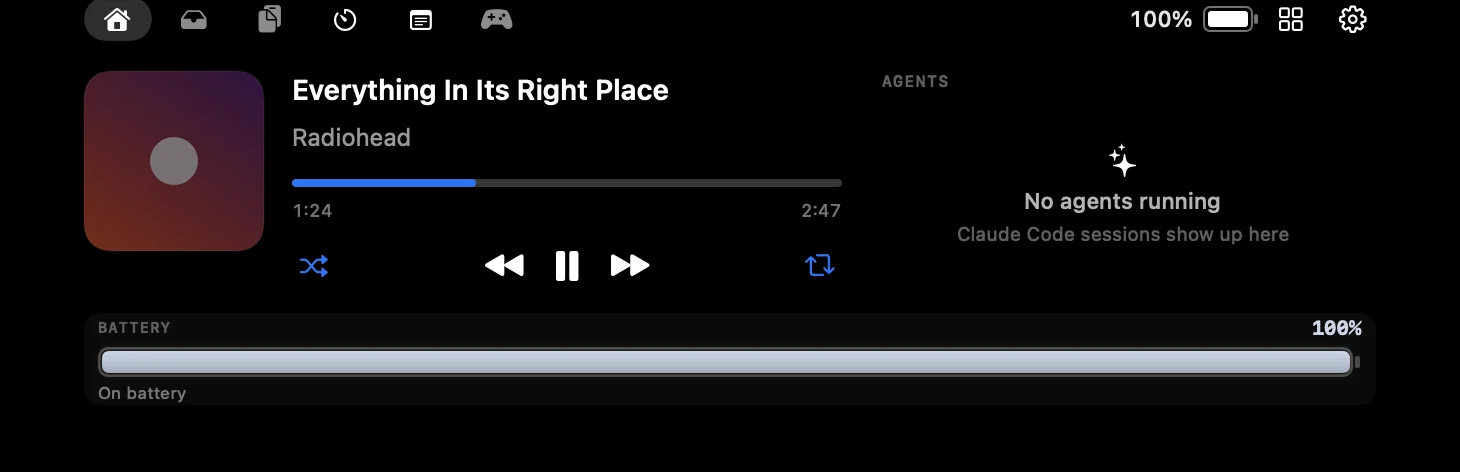
Hover the notch and Home shows artwork, the title and artist, shuffle and repeat, previous and next, and a progress bar you can drag to seek.
Works with what you already use.
| Source | What works |
|---|---|
| Apple Music app | Artwork, title, seeking and all transport controls. |
| Spotify app | Artwork, title, seeking and all transport controls. |
| Browser media | YouTube, YouTube Music, Spotify, Apple Music, SoundCloud, Bandcamp, Twitch and Vimeo in Safari, Chrome, Brave, Edge and Arc. |
Reading a browser tab’s artist, artwork and position needs the browser’s “Allow JavaScript from Apple Events” switch. Without it, FunNotch falls back to the tab title. The install guide shows where the switch is, and Settings → Media can flip it for you.
Volume and brightness, redrawn.

Press a volume, brightness or keyboard backlight key and the level appears in the notch. FunNotch replaces the macOS overlay instead of sitting beside it, so you never see two.
Common questions.
Does FunNotch work with Spotify?
Yes, both the Spotify app and Spotify in a browser. It also works with Apple Music and media playing in Safari, Chrome, Brave, Edge and Arc.
Can I control YouTube from the notch?
Yes. FunNotch reads YouTube and YouTube Music tabs and can play, pause and skip. Artwork and progress need “Allow JavaScript from Apple Events” in the browser.
Why does macOS ask for Automation permission?
Reading and controlling Music, Spotify or a browser is done through Apple Events, which macOS guards with the Automation permission. You can decline, and the player will say what it cannot see.